Most people never decide whether their website should be dynamic or static, WordPress decides for them.
WordPress is dynamic by default: it stores content in a database and builds each page on request.
Dynamic websites are great if you’re building a website that dynamically changes its content or layout in real time for each visitor and has logged-in users with accounts, carts or dashboards, or maybe if you want a non-technical audience to be able to update the website.
For anything else, a static website is probably going to be faster, more secure, and cheaper to run.
Let’s look at each in turn and decide whether your WordPress site would be better served by a static framework.
TL;DR: should your marketing website be dynamic or static?
- WordPress is dynamic by default: content lives in a database and every page is built on request
- Dynamic is worth it if you have logins, carts (e-commerce), or content that changes per visitor
- Dynamic costs you slower pages, more security vulnerabilities, and caches that fall more often out of sync
- Static is better for speed, security, and letting an AI work on your site directly
- Static costs you in convenience and technical complexity
What is a dynamic website and what are its advantages?
Before we discuss the benefits of dynamic websites, let’s be clear on what a dynamic website actually means.
Simply put, a dynamic website means that the website is assembled fresh on every request.
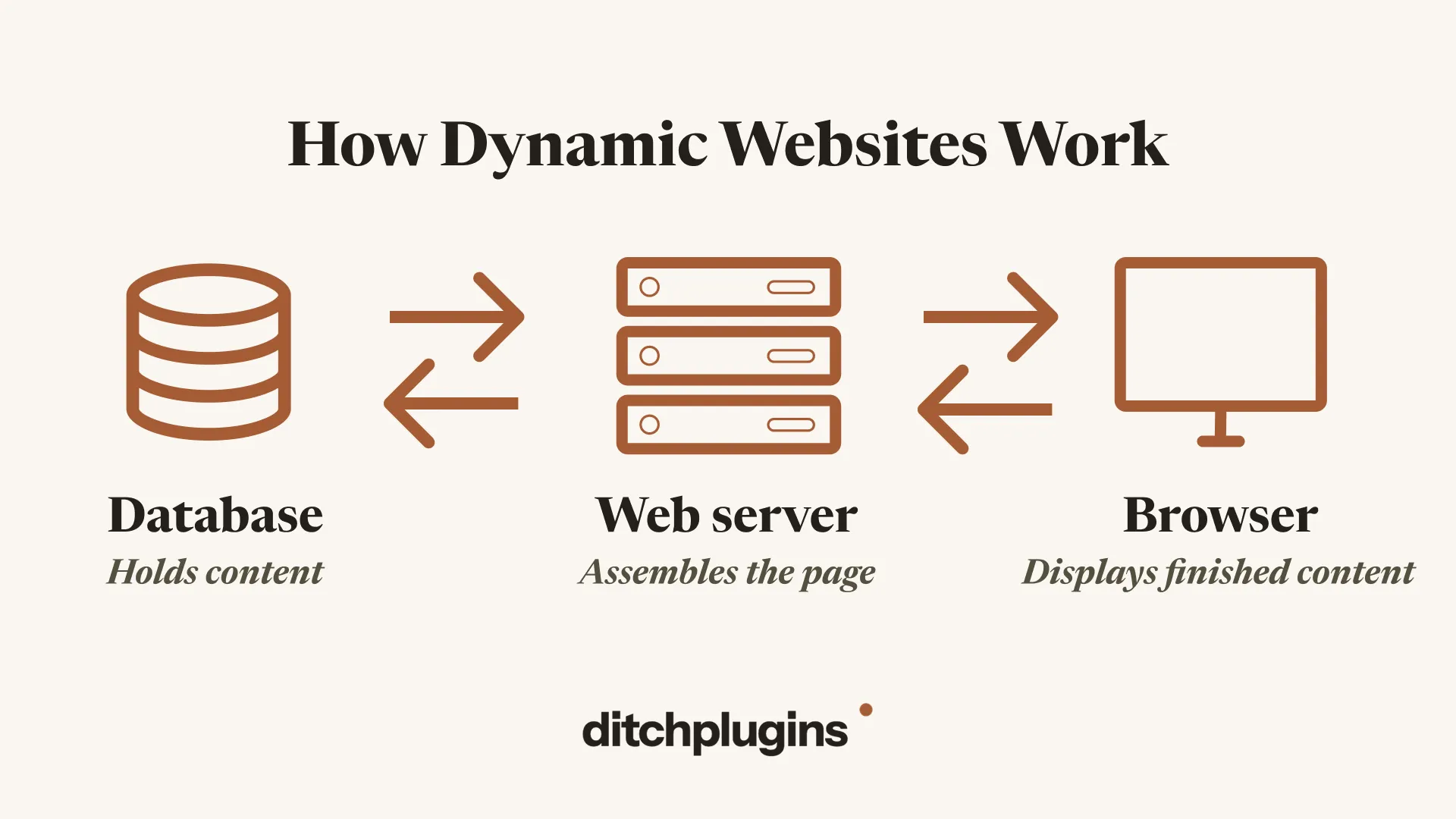
Say someone clicks a link to your pricing page. Their browser sends a request to your web server. The server works out which page is being asked for, then goes to the database and pulls back the content for it — the headings, the copy, the prices. It drops all of that into your template, builds the finished HTML, and sends it back down the line. The browser then renders it on screen.
And that process happens every single time, for every visitor, on every page.
That is what we mean by dynamically generated pages.
If we want to get fancy with terms, for WordPress the database is MySQL and the code doing the assembling is PHP.
Now that’s out of the way, let’s look at the benefits of a dynamic website.
Dynamic websites are very easy to update
Say you want to change the title of a blog post. You log into WordPress, edit the page, hit update and it’s done. The next person who opens that post sees the new title (unless you run into caching issues, and we’ll cover that point after).
That process works because your content lives in the database, and pages are only built when someone asks for them. So when you change the title in the database, that’s the entire job. Every page that shows that title goes and fetches it fresh the next time someone visits.
And you never have to go near the database to do it. That’s what the WordPress editor is for. It gives you a login, a set of permissions and a text box, and writes whatever you type into the right row. You’re editing a database without having to code.
That means anyone on your team can change the site, not just whoever has access to the code. And that’s a huge advantage for non-technical people who want to update the website.
Dynamic websites can personalize the content you display for each user
Because the page is built at the moment someone asks for it, the server knows who’s asking, whether they’re logged in, what they’ve bought, what country they’re in, what they looked at last time, etc.
So a dynamic website can essentially assemble a different page for each person.
For example, say you offer 10% off promo for first orders. A dynamic site can show that banner to new visitors and hide it from everyone who’s already bought from you in the past.
That’s an awesome feature, and clearly an e-commerce site that stores logins or purchases definitely needs to be dynamic.
But ask yourself the question, does your marketing website need to be dynamic?
Are you displaying content in a highly personalized way for each user, beyond displaying the prices in the visitor’s local currency?
If the answer is no, then you probably don’t need a dynamic website, and the benefit you get from being able to easily update your content is far outweighed by the negatives.
What are the downsides of dynamic websites?
Dynamic websites are more prone to security issues
Because of how the flow works between the database, the web server and the browser, there are more ways in for hackers to exploit. Every page is built by code talking to a database, there’s a login page sitting on your domain for anyone to find, and every form, search box or comment field is another place where a visitor can send something to your server. Each one of those is a way in for hackers, and each one is a vulnerability threat.
With WordPress, most of those ways in come from plugins. In fact, 91% of vulnerabilities for WordPress websites come from plugins.
That’s because every plugin you install is code written by somebody else that runs on your site with the same access as WordPress itself. It can read and write to your database, and do anything WordPress can do.
Given that plugins are shared across thousands of websites, finding a flaw in one gives hackers access to every site running that plugin’s unpatched version.
Dynamic websites (especially WordPress) are slower
WordPress websites aren’t generally the ones with the best performance — fewer than half of all WordPress websites have passing Core Web Vitals.
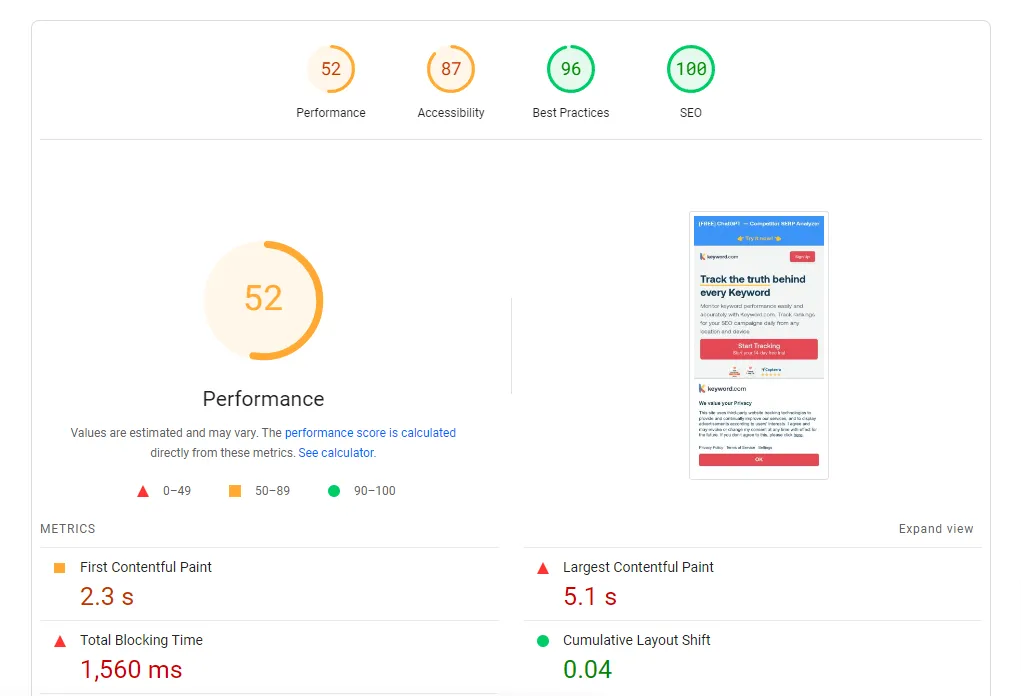
PageSpeed score for Keyword.com on WordPress
Every time somebody visits a page, the server has to start up PHP, load WordPress, your WP theme and every active plugin, query the database and then assemble the page, all before the visitor sees anything at all.
And that slows things down.
The usual fix is to put a cache in front of it so most visitors get a saved copy instead. It works, but you’re not solving the problem, you’re swapping it for a different one (which I cover below).
There are a lot of differing opinions on page speed. Here’s why I care about having a good pagespeed score (especially on mobile):
- Google mobile-first indexing means Google uses the mobile version of a website for indexing and ranking. A slow mobile webpage is a negative ranking factor.
- Countless studies show that speed affects conversions directly. With over half of the web traffic coming from mobile, your website better load quickly for that device.
- Fast load times prevent AI scrapers from timing out and this can improve AI search visibility if your website was really slow to begin with.
Dynamic websites are prone to caching issues
At first, I thought this was just a problem with my website, but actually after some digging I found out that this is a pretty common problem with WordPress websites.
And the fact that they’re dynamic might be partially responsible for why the website looks completely funky after you edit and update it.
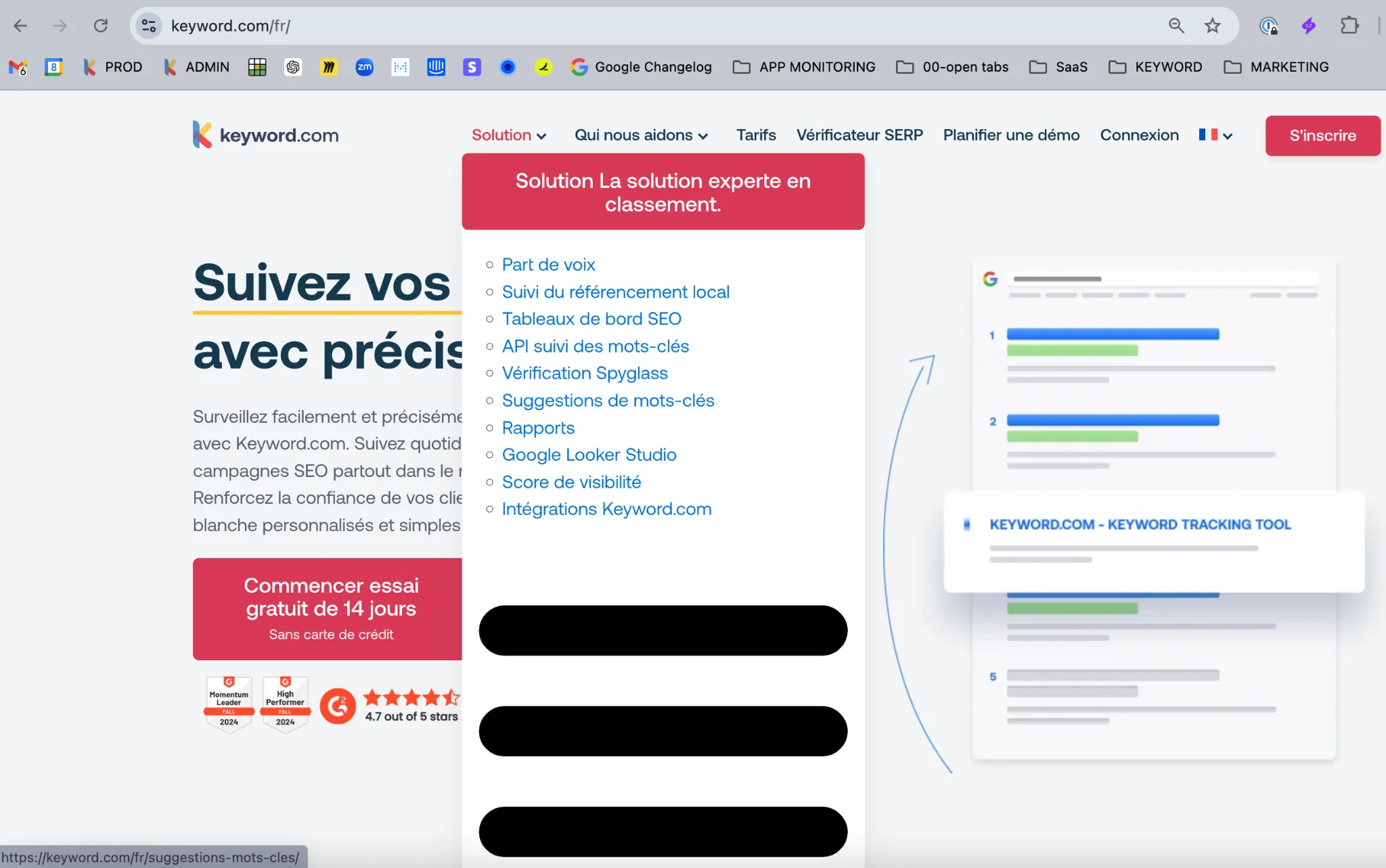
Our French homepage, in production, after a routine update
This was our French homepage, in production, after a routine update. The HTML shipped, but the styles didn’t, so the mega-menu unrolled into a bare bulleted list with a red button on top and black bars below for anyone who happened to visit. Nothing was broken in the build. The cache just hadn’t caught up.
Let’s look back at the dynamic websites flow chart above.
When a request comes in, PHP starts up, WordPress and all your plugins load, the database gets queried, and the page gets assembled.
That’s a lot of work, and for most pages the process is fairly redundant because unless you’re dynamically updating the page for each user, the rendered page is identical for everyone.
To handle this with WordPress you can install the WP Rocket plugin to save static copies of pages so the server skips running the same code and queries over and over.
Here’s the catch though, caching doesn’t happen in one place. It happens in several, including your CDN, your hosting solution, the visitor’s browser, and yes, your beloved plugins.
What this means essentially is that you’ve got several copies of your website sitting in different places. So when you make an edit, that change lands in the database straight away, but every one of those other copies might still be holding the old version.
And that’s how you end up with either changes not showing up in the rendered page, or the design going completely crazy, as was the case for our French page above.
Alright, now that we’ve covered what dynamic websites are, its advantages and disadvantages, let’s look at the alternative — static websites.
What is a static website and what are its advantages?
Unlike a dynamic website, a static website has no database being queried when someone visits, no PHP starting up, and no page being assembled when somebody visits. Every page was built in advance via HTML, CSS and JavaScript, so all the server does is hand over a finished file.
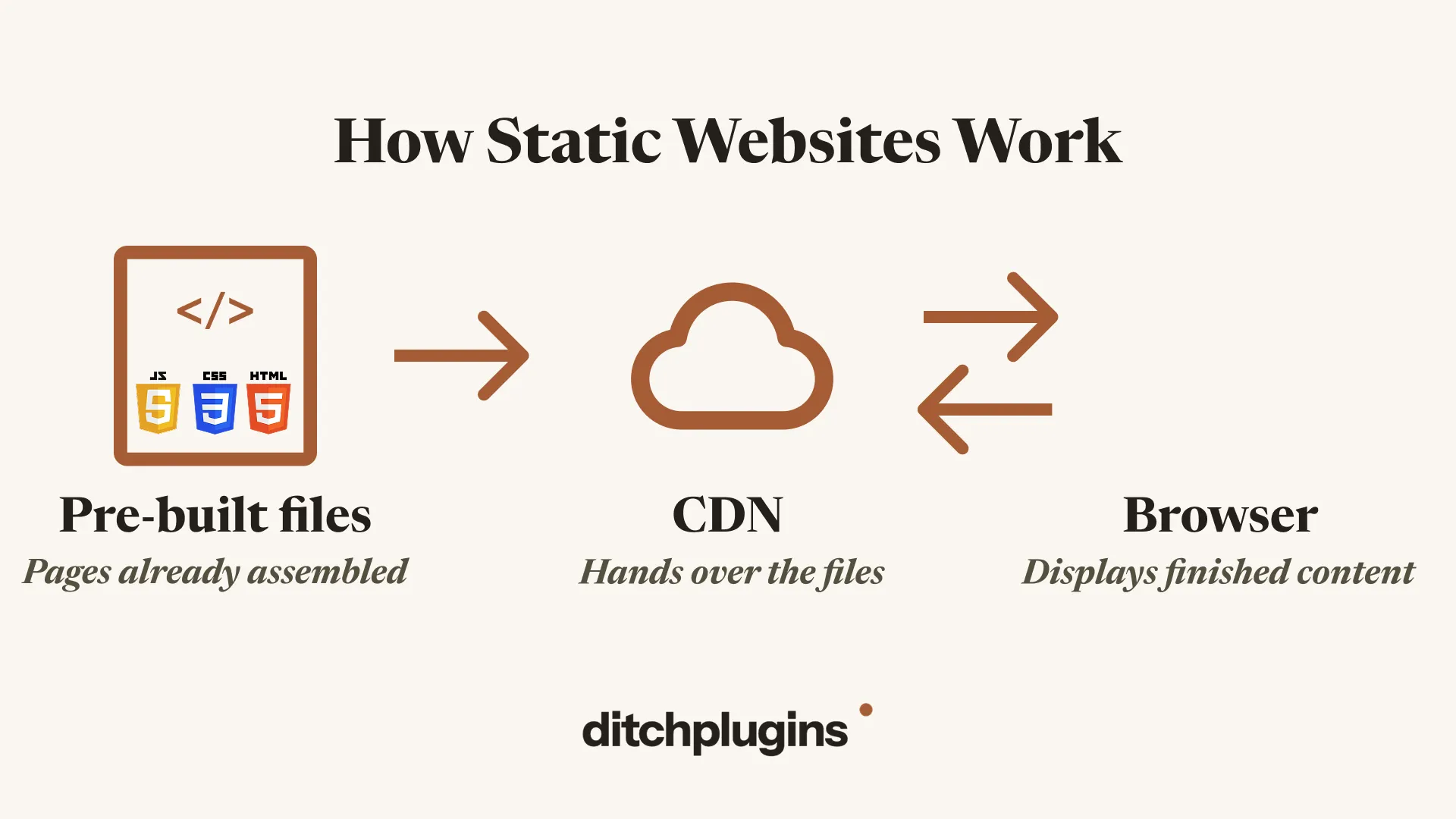
Here the flow is very simple. Say someone opens up your homepage, their browser asks the CDN for it and the CDN sends the files back and the browser renders them.
The whole process is just far simpler, and that simplicity is where all the advantages come from.
Static websites are more secure
There’s no database, no code running on the server when somebody visits, no login page sitting on your domain, and no vulnerable plugins to exploit.
A static site is just a bunch of files that are pre-built and handed over. There are simply fewer entry points for hackers to exploit.
Disclaimer: this doesn’t make it bulletproof. It just moves the risk somewhere you can better control — your code, your hosting account and your build process.
If you’re not taking advantage of the content personalization dynamic websites give you, you’re taking on all the risk for very little gain beyond being able to manage the website via a CMS.
Static websites are faster
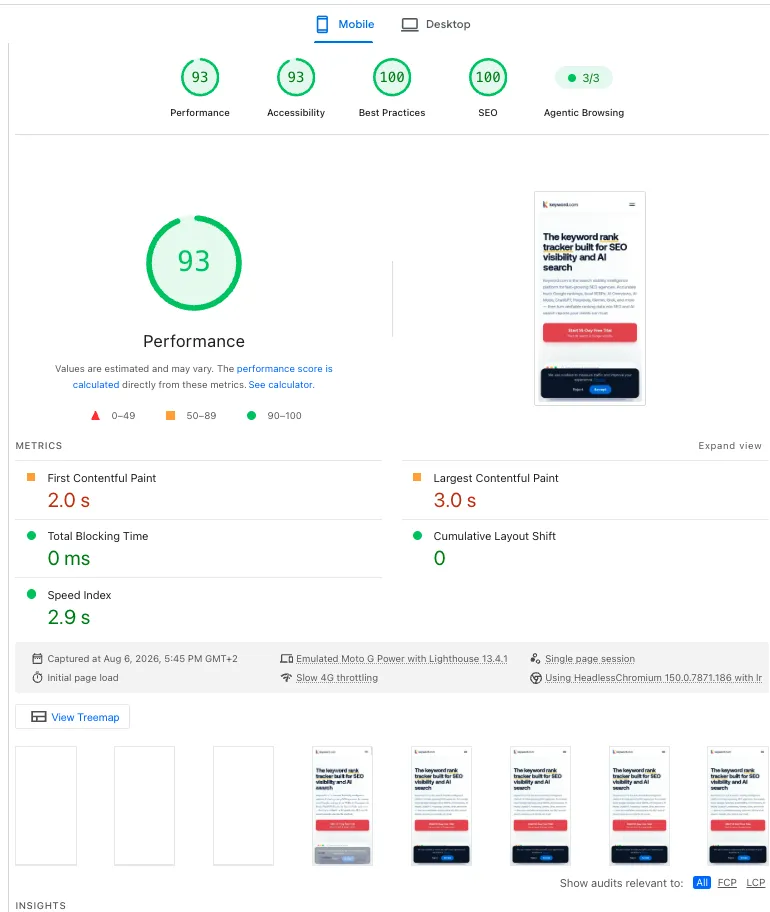
PageSpeed score for Keyword.com on Astro
The files already exist, so the only thing sitting between your visitor and your page is the time it takes to send them over.
This simplified process is why static websites tend to load quickly, score well on PageSpeed Insights, and generally hold up better on mobile Core Web Vitals than dynamic ones.
Static websites are less prone to caching issues
Caching still happens on a static website. The difference is what’s being cached and how many layers are involved.
There’s no page-cache plugin and no object cache — just the CDN and the visitor’s browser.
When you publish an edit, the build produces a new set of files and they all go live as one deploy.
Caching issues can still of course happen, but there are far fewer places for copies of the site to drift away from.
Static websites are AI-friendly
Because a static website is just text files, an AI tool can easily read and work on all of it.
Your content sits in markdown files. There’s nothing hidden away in a database that it needs to reach first.
If you have Claude Code, you can easily instruct it to work on your website, wire up specific agents and run skills without having to copy and paste content back and forth between a chat window and your editor.

It is possible to integrate AI tools with dynamic websites, but with WordPress it’s more work and a lot more limited.
Okay, so static websites have some awesome benefits, but they do come at a cost in terms of convenience and personalization.
What are the downsides of static websites?
Static websites are harder for non-technical people to update
By default, static websites have no logins or editors to work with.
Your content sits in files, which means that changing something requires access to the code, knowing which file to open and being able to deploy it.
Instead of writing out a blog post in the editor, you’ll upload a markdown file.
Instead of uploading an image through the media library, you’ll drop the file into a folder and point to it in your code.
For some marketers, this is a big enough blocker to rule out static completely, and that’s fair enough.
However, with AI, instead of having to manually open and edit the code, you can describe what you want in plain English and let whatever AI tool you’re using go and find it.
One solid weekend of learning the basics of HTML, CSS and git, coupled with a Claude Code subscription, will get you most of the way there.
Static websites make you build what plugins used to do
Want a contact form, a search box, comments, or a newsletter signup field?
On WordPress there’s a plugin for all of it.
On a static site you’re wiring up a third-party service via an API or building it yourself.
If you’re not especially technical, this can sound complicated, but again, because of the way AI tools work with static sites, it’s a lot more manageable than it looks. You can describe what you want, ask Claude to go and research how to do it, and it’ll come back with the steps and do most of the work for you.
Static websites show everyone the same content
Probably the biggest downside to static sites is that every website visitor gets the same version of the website (unless you use on-demand rendering for specific pages).
This is only really a problem if you’re an e-commerce, a social media website, or want to display content dynamically according to who’s viewing the page, like for example hiding the “book a demo” button from visitors who are already customers.
Per-visitor content is a real advantage of staying dynamic, but only if your site is actually using it.
Verdict: should your website be dynamic or static?
If people log into your website, if you’re an e-commerce, or if you’re genuinely showing different content to different visitors, stay dynamic. That’s exactly what it’s built for and the downsides in terms of caching, security and speed are worth managing.
But if you’re running a marketing site where every visitor sees the same pages, it’s worth asking what you’re actually getting with WordPress. In most cases it comes down to one thing: a CMS with a nice editor to write in.
In that case, it might be worth considering a migration to a static website.
That’s exactly what we do at Ditchplugins. We migrate WordPress marketing sites over to Astro, a static site generator.
We rebuild the site exactly as it is on WordPress and teach you how to run it using AI.
Our launch offer includes two free migrations. Get in touch with us on our website.